
Robot gripper fingers can be dimensionally acceptable and still release, rotate, or mark a part. The cause is often a mismatch between the contact face, the gripper’s mounting reference, and real part variation—not simply a lack of clamping force. CNC machining is useful when fingers need controlled interfaces, repeatable pairs, replaceable contact features, or geometry that cannot be produced reliably from a simple blank.
The design decision starts with what the finger must do: locate, support, contain, or apply force. That function determines which surfaces need controlled machining and how the finished pair should be inspected. This guide focuses on the engineering decisions behind robot gripper finger machining rather than treating every finger as a generic bracket.
Define the Grip Before Drawing the Finger
A friction grip has a different job from a finger that nests a component against a hard stop. Friction depends on contact area, surface condition, applied force, and the risk of crushing or marking the workpiece. Form-fitting fingers resist movement through geometry, but pockets and shoulders must accommodate part variation and the direction of handling forces.
Show the workpiece datums, jaw interface, loading direction, and whether the jaws close symmetrically. Identify any fixed-side reference and whether the part must seat against a stop. Without that context, the drawing may be machined accurately while the assembled gripper contacts one corner first or fails to locate the part repeatably.
Separate a replaceable wear element from the structural finger when product variation or maintenance makes that useful. A bolted pad or insert can be changed without replacing the whole jaw, but its interface needs locating features and fastener access. Bolt clearance alone is not a repeatable location method.
Match Contact Geometry to the Part
Design contact faces around the surface they actually touch, not only a nominal CAD model. A broad flat face may touch a curved part at two edges. A V-nest may locate a round feature while becoming sensitive to diameter variation. A relieved pocket can prevent a cosmetic surface from unintentionally becoming the locating datum. If a compliant pad is used, compression and wear become part of the positioning chain.
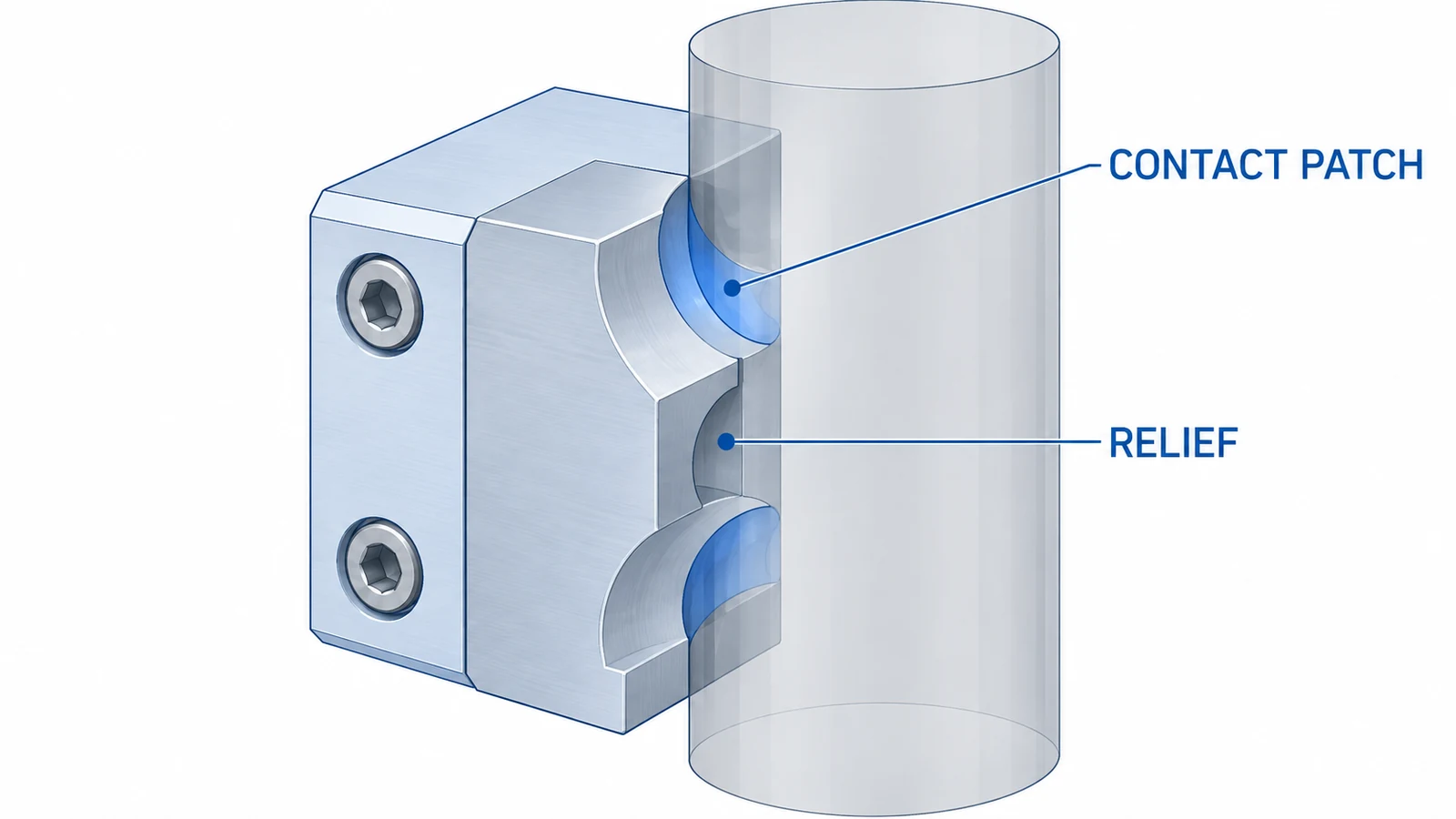
For delicate or coated parts, mark permitted contact zones and edges that must remain burr-free. A sharp edge can scratch a workpiece even when the overall profile is correct; an unspecified edge break can also remove too much material from a small locating step. Call out a measurable condition on functional edges instead of relying on a vague note to cover every edge.
When one gripper handles several variants, distinguish common surfaces from variant-specific features. A single deep pocket intended to cover a wide tolerance range can leave each version poorly supported. Compare the part envelope with the usable contact area and the available jaw travel before finalizing the finger.
Control the Mounting and Locating Chain
Define the primary seating face, any shoulder or register that establishes position, and the fastener pattern that retains the finger. If dowels or a precision step locate the jaw, dimension the contact surface from those references. Avoid accumulating critical dimensions from unrelated outside edges when the assembled datum actually controls grip position.
Paired fingers need an explicit relationship: mirror-image geometry does not guarantee a matched opening or centered grip. The parts may need a common setup, a shared inspection reference, or verification in an assembly fixture. State whether acceptance applies to each finger independently or to the assembled pair; that choice affects both machining strategy and inspection evidence.
End-of-arm tooling may include a robot flange, tool plate, adapter, jaw, and finger. A correct finger cannot compensate for an upstream offset or angular error. Review the finger’s datums alongside the relevant CNC milling capability and the tool-plate interface.
Choose Material Around Load and Contact
Material selection should reflect gripping force, workpiece hardness, environment, cleaning, wear, and mass at the robot wrist. Aluminum may suit a lightweight structural finger when stiffness and contact conditions permit. Steel may be considered for a highly loaded or wear-prone contact element; engineering plastics can suit selected low-marking or insulating applications. These are candidates, not universal prescriptions. Specify the exact grade, condition, stock form, and finish.
Material location matters as much as total mass. Removing weight at the end of a long finger affects moving inertia differently from removing the same amount near the jaw. Deep pockets and thin webs can lower stiffness or make the contact face sensitive to clamping and cutting forces. Review the load path through the remaining section instead of judging only the outside shape.
Coatings and surface finishes can change friction and wear. Protect locating surfaces whose dimensions must remain stable. The site’s aluminum material information can help with grade review, while the application drawing must define the actual alloy and temper.
Plan Machining Around Thin Sections and Access
Finger blanks often combine mounting holes, narrow contact features, pockets, and slender sections. Roughing can release stress or expose a wall that moves as material is removed. Depending on stock and geometry, a process plan may rough first, preserve temporary support, allow the part to stabilize, and finish the critical datums and contact profile from controlled references. The appropriate sequence depends on tolerance, geometry, and quantity.
Check tool access before finalizing a profile. Deep concave contacts may require a small cutter and leave a radius that affects seating. Narrow slots can trap chips or complicate deburring. Internal corners should reflect feasible tool radii unless a sharp corner is functionally essential and a secondary operation is accepted. A model that assumes inaccessible zero-radius corners creates avoidable ambiguity.
Inspect the Pair as a System
Separate part-level dimensions from assembled behavior. Measure the jaw face, locating step, hole pattern, and contact profile from the datums that establish the installed position. For a matched pair, verify gap or symmetry in a representative fixture rather than comparing two independent reports alone.
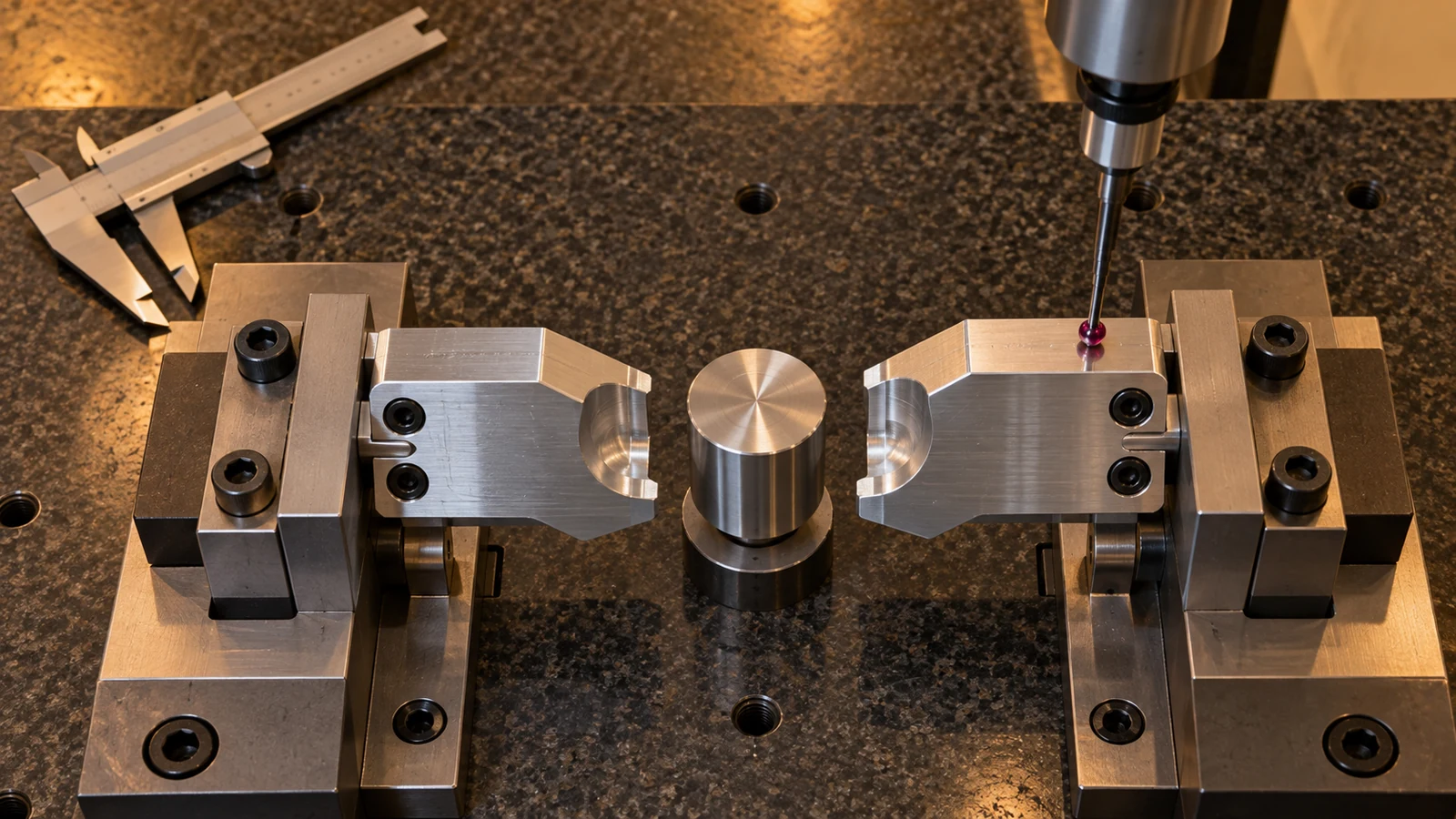
Functional checks can confirm seating, contact locations, rocking, and marking with a representative workpiece. They do not replace dimensional inspection: the report checks selected geometry against drawing limits, while the trial grip checks whether the assembly performs with the actual part and motion. If a problem appears, inspect jaw alignment, finger pairing, part variation, pad condition, and closure force before simply increasing force.
What to Include in the Machining RFQ
Provide a controlled drawing or model, material grade and condition, quantity by revision, finish, and functional datum scheme. Mark contact zones, mounting references, critical edges, and surfaces to protect during finishing. Include a representative part or dimensional envelope when the finger must match a product surface.
Clarify whether the quote covers one finger, a matched left-right set, replaceable inserts, or assembly-level verification. State how pair geometry will be accepted and whether a functional trial is required. These details align machining scope with the gripping result instead of quoting only an isolated metal shape.
Frequently Asked Questions
Should gripper fingers be machined as a matched pair?
When both sides determine a centered position or opening, define the relationship and inspect them together. Individual inspection may suffice if each side is independently adjustable, but the assembly method should be clear.
Is aluminum always the best choice?
No. Mass, stiffness, wear, workpiece marking, environment, and cleaning all matter. Select a specific grade and condition from the application requirements.
What matters most on the drawing?
Show how the finger locates on the jaw, where it contacts the part, and which dimensions control the assembled grip. Those references are more useful than applying tight tolerances uniformly.